
Short links on your company’s own domain: why it matters and how to set it up
A link like “go.company.com/offer” earns more trust than a generic domain. How to add your domain in Li-Nk, how long DNS takes and what you can set on it.

When a customer gets a text message with “li-nk.ro/x7Kq2”, they have no idea who it is from. When they get “go.company.com/offer”, they do. A domain of your own has three advantages: it is easy to recognise, it does not depend on the reputation of a domain shared with others, and all your clicks show up in the same dashboard, under your own brand.
Why use your own domain
People click more readily on what they recognise: your company name in the address says where the message comes from. In addition, generic shortener domains are also used by spam, and some filters treat them more strictly than a company’s own addresses. There is no figure that holds for everyone; the best test is your own: the same message, half of the list with your own domain and the other half with the generic one, then compare the clicks.
How to add the domain
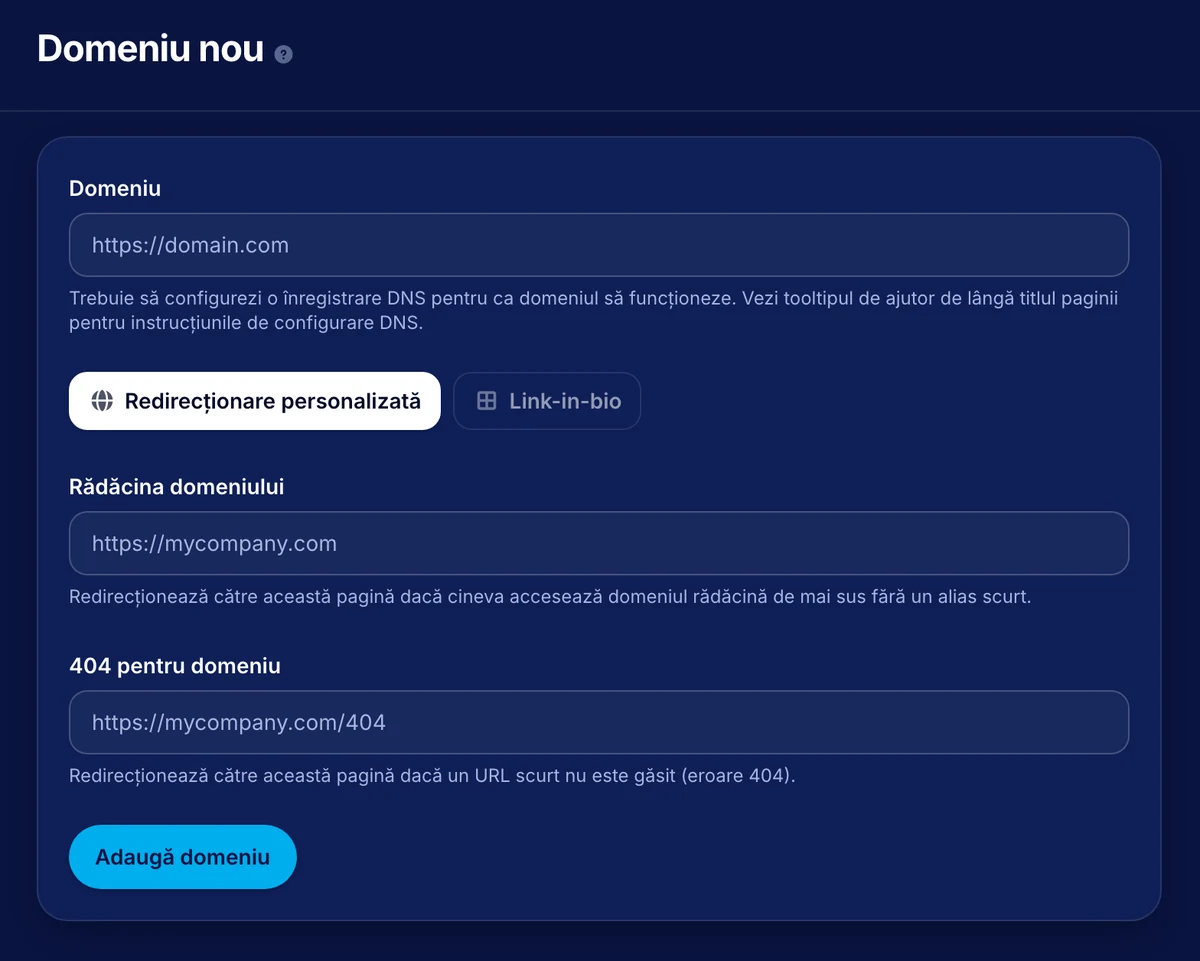
In the dashboard, under “Branded Domains”, click “Add Domain” and type the full name, for example go.company.com. On the same page you can also set what happens for addresses without an alias:
- Domain Root: the page that anyone who opens the bare address, without an alias, is sent to (for example your company website);
- Link-in-bio: a bio page you can show directly on the domain root;
- Domain 404: the page that short addresses which no longer exist are sent to.
DNS and certificate
For it to work, the domain needs a DNS record. Until the change propagates, the domain shows the status “Pending DNS”; propagation can take up to 36 hours. After that, the status becomes “Active”. We give you the exact values for the record, and we also configure the domain’s HTTPS certificate, so you do not have to deal with it.
Once the domain is active
For any new link you pick the domain from the list and type the alias. When you edit an existing link you can change the domain, but be careful: a change means a new address. Do not move links that have already been sent or printed, so you do not risk breaking addresses that are already in circulation.